Home Blog Page 2

What is a VOIP caller? 

0

A lot of times you may be thinking about what is a VoIP caller , but what exactly is it and how do you know if it’s a better option than using a cellular provider or landline. 

What is a VoIP ?

VOIP means Voice over Internet Protocol and the person who uses VoIP is called a VoIP caller. VOIP is a technology that converts the analog voice signals into digital data packets that are transmitted over the internet to the recipient. This allows for calls to be made from a computer, a smartphone with a VoIP app, or a dedicated VoIP phone. 

Who Are VoIP Callers and What Do They Use?

Anyone who uses apps like WhatsApp, FaceTime, or Skype to make voice calls is a VoIP caller. Companies use VoIP for their entire phone system, replacing traditional landlines.
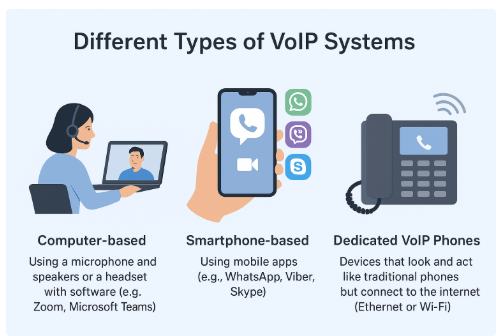
The different type of VoIP Systems include-

  • Computer-based: Using a microphone and speakers or a headset with software (e.g., Zoom, Microsoft Teams).
  • Smartphone-based: Using mobile apps (e.g., WhatsApp, Viber, Skype).
  • Dedicated VoIP Phones: Devices that look and act like traditional phones but connect to the internet (Ethernet or Wi-Fi).

Key Advantages of Being a VoIP Caller

Voice over IP calling offers advantages over individual phone lines and traditional multi-line phone systems, such as:

1. Lower costs: VoIP calls are way cheaper than traditional phone services that you use. Often business VoIP calling involves monthly fees per user or line, and helps avoid long-distance fees by making long-distance calls at local rates.

2. Flexibility across devices: VoIP works easily on smartphones, laptops, desktops, and IP-enabled desktop phones. You can access the number using the internet whenever and wherever you want.

3. Easy to scale: You can add new users very simply with VoIP. There is no need for extra phone lines or hardware. Businesses can expand their team with ease.

4. Advanced features: It has more advanced features as is has extensive IP telephony systems, built on VoIP technology, has different features such as call forwarding, voicemail-to-email integration, IVR, analytics, and call recording. These all help teams work better and boost their productivity.

5. Better call quality: With a stable internet connection, VoIP offers clear, crisp audio. Customers experience less dropouts and background noise as compared to traditional calls.

6. Strong security: Reputable VoIP providers offer encryption, call protection, and secure data storage. These measures help keep business calls and customer information safe.

7. Simplified management: Most VoIP systems, especially hosted VoIP services, come with user-friendly dashboards. The provider manages the core infrastructure, you can manage users, track performance, and make changes.

Based on recent reviews and features, here are five top VoIP services that are great for business,

RingCentral

  • Unified Communications: It is an all-in-one platform that combines voice, video, team messaging, and fax into a single application, making it ideal for comprehensive business communication.
  • Advanced AI Features: It includes powerful AI tools for real-time call transcription and summaries, which can significantly boost team productivity and help with data analysis.
  • Scalability: RingCentral is highly scalable and can easily adapt to the needs of businesses from small startups to large enterprises.

Dialpad Connect

  • AI-Powered Insights: A key feature is Voice Intelligence, which transcribes calls in real time and provides actionable insights, making it perfect for sales and support teams.
  • Ease of Use: It has a very intuitive interface that is simple to navigate, ensuring a smooth user experience even for those new to VoIP.
  • Seamless Integration: It integrates with many popular business tools like Salesforce, Google Workspace, and Microsoft 365, streamlining workflows and connecting to your existing tech stack.

Zoom Phone

  • Affordability: It’s one of the most budget-friendly options, especially for companies that need basic VoIP functionality without extensive frills.
  • Familiar Interface: For teams already using Zoom for video meetings, the phone service offers a familiar and easy-to-use interface, reducing the learning curve.
  • Reliable Performance: Known for its call quality and reliability, making it a dependable choice for remote and hybrid teams.

Vonage Business Communications

  • Flexible Solutions: Vonage offers a flexible and customizable platform that can be tailored to the specific needs of small and medium-sized businesses.
  • Deep Industry Roots: As a long-standing VoIP provider, it has a mature and refined feature set, including robust call management and routing capabilities.
  • Extensive Integrations: It has a wide range of third-party integrations, particularly with major CRMs, which is beneficial for businesses that rely on customer relationship management.

DialOnCloud.com

  • All-in-One Sales Platform: This service is specifically designed as a customer engagement and lead generation platform, combining VoIP calls with marketing tools.
  • Built-in Marketing: Key features include SMS and email marketing campaigns and a lead management dashboard, allowing businesses to manage sales and communication from a single place.
  • Interactive Voice Response (IVR) Builder: It offers a user-friendly, drag-and-drop IVR builder, allowing users to easily create and customize automated call flows without needing technical expertise.

Challenges of using VoIP

VoIP is a good solutions to modern day customer experience services. Some challenges that VoIP Users face are –

  • Reliant on Internet Connection: Emphasize that call quality is only as good as the internet connection. Poor connection can lead to choppy audio or dropped calls.
  • Power Outages: VoIP phones won’t work during a power outage unless there is a backup power source.
  • Emergency Calls: Briefly touch on the differences in how 911 (or other emergency services) calls are handled with VoIP compared to traditional landlines, which can pinpoint a physical location.

Conclusion

Using a VoIP is like using the internet to make a phone call instead of a regular phone line. It helps people and businesses call each other more easily and saves them a lot of money.

VoIP is here to stay, as it’s fundamentally a better way to connect. It works so well and has so many cool features that it’s becoming the top choice for today’s phones.

You should check out VoIP for yourself or your business. To start, go to DialOn Cloud today!    

How Do You Measure Customer Satisfaction for business growth?

0

Happy customers are vital to any business. They not only keep coming back but also tell their friends about you, and in this way, word-of-mouth becomes one of the most powerful marketing tools. But in today’s fast-paced digital world, how do you measure customer satisfaction? Guessing isn’t an option anymore. The best way to know your customers is to use a data-driven approach, by using modern communication tools.  

Why Is Measuring Customer Satisfaction Important?

When a customer calls your business, it means they are interested. Since they are spending money, they expect to have a good experience. If that experience is not good enough, they’re likely to take interest elsewhere. On the other hand, a great experience builds trust and loyalty. By measuring customer satisfaction, you can find out what’s working and what’s not in your customer service process. This allows you to fix problems, improve your service, and keep your customers happy for the long run.

The Easiest Ways to Ask Your Customers

So, how do you measure customer satisfaction? Modern communication platforms make it easy to gather feedback when it is needed. 

Here are the three most common metrics you can use:

  • Customer Satisfaction Score (CSAT): This is the easiest way to measure customer satisfaction with a specific engagement, like a phone call. 

For example – Your communication platform can then automatically send a quick, post-call survey like, “How satisfied were you with our service today?” on a scale of 1 to 5. This gives you a clear insight of how your team is performing.

  • Net Promoter Score (NPS): NPS (Net Promoter Score) measures customer loyalty and how likely a person is to recommend your business to others.

For example – If you ask a customer, “On a scale of 0 to 10, how likely are you to recommend our company to a friend?” Your communication tools can easily send this survey via a follow-up text or email. The responses tell you who your loyal customers are and who might be at risk of leaving.  

  • Customer Effort Score (CES): CES measures how easy it is for customers to do business with you, and getting their problems solved.

For example – If you ask, “How easy was it to get your issue resolved today?” A modern business phone system with smart call routing and CRM integration helps you achieve a high CES score by connecting the customers with the right person quickly and providing agents with the information they need to solve the problem in one go.

The Value of Customer Feedback

While scores are great, they don’t always tell the full story. To truly understand your customers, you have to listen. A powerful business communication platform offers features that help you do just that. This is another key part of understanding how you measure customer satisfaction.

  • Call Recording and Monitoring: These features allow you to listen to actual customer conversations, giving you unfiltered insights into their tone, pain points, and needs.
  • Analytics and Reporting: Your system’s dashboard can show you history about your calls. It tells trends in call volume, hold times, and call transfers. This data helps to identify areas of problems  and further improve your customer service.

To sum up:

Measuring customer satisfaction is no longer an easy task. It’s a necessity for modern businesses that want to grow. By using a data-driven approach with a combination of scores and quality feedback, you can help your customers understand better. 

A smart business communication platform like DialOnCloud gives you the tools to not only gather this critical feedback but also to use the insights to build a better, more customer-focused business. So, how do you measure customer satisfaction? The answer is with a strategic approach and the right tools.

What is an IVR System? A Complete Guide for Businesses in 2025

0

In a rapidly forward advancing digital era, customers want quick, efficient and hassle free communication. Whether the customer, request support, or to make a purchase. How your business handles the incoming calls can play a big role in customer satisfaction. That’s where the IVR system comes into action.   But what is IVR System and how does it work? And how can it transform your customer service experience? 

Understanding IVR: Interactive Voice Response

IVR (Interactive Voice Response) is an automated phone system technology allowing incoming callers to interact with a pre-recorded voice menu. It uses their phone keypad or voice commands. IVR helps route calls to the appropriate department or agent without the need for a live operator. By offering self-service alternatives that enable users to obtain the information they require without the help of customer support, IVR systems enhance the customer experience.

When you call a company and you hear something like, “Press 1 for Sales, Press 2 for Support….” That is an IVR System in work.

Key Features of an IVR System

IVR Systems had some key features which helps in enhanced customer experience. Some of them include –

  1. Call Routing
    IVR systems directs callers to the right department or team based on their inputs. This reduces call transfer delays and improves the overall experience.
  2. Self-Service Options
    This helps customers can check their account status, balance, order updates, or even schedule appointments without speaking to an agent.
  3. 24/7 Availability
    An IVR system can handle incoming queries even during off-hours, ensuring your business is always responsive.
  4. Multilingual Support
    Businesses with different customer bases can provide menus in multiple languages, helping personalize the experience.
  5. Integration with CRM or Ticketing Systems
    Modern IVR systems can be integrated with your CRM tools, enabling agents to have complete customer information when they answer the call.

Benefits of Using IVR in Business

IVR systems is beneficial to businesses as it increase efficiency and customer satisfaction while reducing costs and projecting a professional brand image.

  • Increased Efficiency: Automates call routing, reducing the workload of receptionists or call center agents.
  • Cost-Effective: Eliminates the need to hire additional support staff for basic queries.
  • Professional Brand Image: Greets callers with a consistent, polished tone, making your business look more organized and trustworthy.
  • Higher Customer Satisfaction: Minimizes wait times and frustration by getting callers to the right person faster.

Common Use Cases for IVR Systems

IVR systems streamline operations for customer support, banking, healthcare, and e-commerce businesses-

  • Customer Support Centers: Route calls based on issue type (billing, tech support, etc.)
  • Banks & Financial Institutions: Balance inquiry, transaction history, card blocking options.
  • Healthcare Providers: Appointment bookings, prescription refills, and lab report inquiries.
  • E-commerce Businesses: Order tracking, returns, and refund requests.

IVR Best Practices for Better Customer Experience

To truly enhance the customer journey and learn how does an IVR work, follow these best practices:

  • Keep It Short and Simple
    Avoid overwhelming callers with too many menu options. Ideally, keep it under 5.
  • Always Offer a Human Option
    Some queries are too complex for automation. Include an option to speak to a live agent.
  • Use Natural Language
    Your prompts should feel conversational and easy to understand—no jargon.
  • Optimize for Mobile
    Most callers use mobile phones. Design the experience with mobile keypads and speech recognition in mind.
  • Regularly Update Your Flow
    As your business evolves, so should your IVR options. Audit and revise it quarterly.

Cloud vs. Traditional IVR Systems: What’s the Difference?

If you’re deciding between old-school systems and modern cloud-based solutions, here’s a quick comparison:

FeatureCloud-Based IVRTraditional IVR Systems
Setup TimeMinutesDays or Weeks
Hardware RequirementsNone (fully online)Requires physical setup
CostSubscription-based, low upfrontHigh initial investment
ScalabilityInstantly scalableLimited by hardware
MaintenanceManaged by providerRequires in-house IT support
CRM & Tool IntegrationEasy API-based integrationsOften not compatible

DialOnCloud IVR System: A Smarter Way to Connect

If you’re considering adding IVR to your communication stack, it’s worth exploring what DialOnCloud brings to the table.

DialOnCloud offers a modern, cloud-based IVR system designed for businesses that value speed, simplicity, and customer satisfaction. With its intuitive interface, you can set up call flows in minutes – no tech team needed.

  • Drag-and-drop call flow builder
  • Custom greetings and multi-level menus
  • Call routing based on working hours or caller input
  • Seamless integration with CRM tools

How to Use an IVR System (Step-by-Step)

Here’s a simple process to set up your own IVR system:

  1. Choose an IVR Provider – Select a reliable, scalable IVR system like DialOnCloud.
  2. Define Call Flow Logic – Decide what options callers will hear (e.g., “Press 1 for Sales”).
  3. Set Up Menus – Use a drag-and-drop interface to create menus and submenus.
  4. Record or Upload Greetings – Customize welcome messages and prompts.
  5. Route Calls – Assign options to departments, agents, or voicemail boxes.
  6. Test the System – Call your own number to ensure everything works smoothly.
  7. Monitor & Improve – Use analytics to optimize caller experience based on drop-off points and usage data.

Thousands of support and sales calls are handled daily using DialOnCloud’s IVR system helping businesses like yours scale effortlessly without missing a call.

Want to see how it works ?

Try DialOnCloud’s IVR feature now and experience how smoother communication can actually lead to more conversions and happier customers.

Don’t just manage calls. Turn them into opportunities.

The Importance of Call Scripting for Fast and Effective Communication

0

A call script is like a cheat sheet or a helpful guide for a person who talks to customers on the phone. Call Scripting is a set of pre-written sentences and questions they can use to make sure they say the right things every time.

Think of it like a script for a play, but instead of actors, it’s for people on the phone. It helps them know what to say at the beginning of a call, how to answer common questions, and what to do if a customer is upset. The script makes sure every customer gets the same correct information and feels like they are talking to a professional.

Call scripting is a game-changer for businesses striving to enhance their communication processes. It provides a structured approach to customer interactions, enabling teams to deliver quick, precise, and impactful responses.

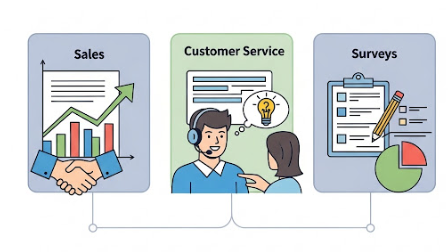
Types of Call Scripts

There are a few different types of call scripts, and they are used for different jobs:

  • Sales Scripts: These are used by people who are trying to sell a product or a service. The script helps them introduce the product, explain why it’s great, and answer any questions the customer might have. It also helps them handle it if the customer says “no.”
  • Customer Service Scripts: These are for people who help customers with problems, like a broken product or a billing question. The script helps them quickly understand the problem, be polite and calm, and guide the customer to a solution.
  • Survey Scripts: These scripts are used when someone calls to ask for feedback. The script makes sure the caller asks the same questions in the same way to every person, so they can easily collect and compare all the answers.

Why is call scripting essential for achieving fast and effective communication?

Call scripting is essential because of the following important reasons-

1. Ensures Consistency

Call scripting streamlines communication, ensuring every customer receives the same accurate information and quality of service. Whether it’s a sales pitch, technical support, or complaint resolution, scripts – including a cold call script – maintain a consistent tone and approach, fostering trust and professionalism.

2. Saves Time and Increases Efficiency

By providing agents with pre-written responses and step-by-step guidance, call scripts reduce the need for on-the-spot thinking. This helps agents handle calls more quickly and resolve customer issues faster, leading to increased productivity and shorter wait times for customers. A structured cold call script further ensures that sales teams can pitch products without wasting time searching for the right words.

3. Builds Agent Confidence

Scripts act as a safety net for agents, especially those new to the role. Knowing exactly what to say and how to address different scenarios boosts their confidence and enables them to handle calls with professionalism and ease. For sales representatives, using a cold call script helps them approach prospects confidently and persuasively.

4. Improves Problem Resolution

Call scripts are designed to anticipate customer needs and guide agents toward effective solutions. By following a structured approach, agents can resolve issues more accurately and reduce the likelihood of follow-up calls. Similarly, a cold call script can guide sales professionals to navigate objections and offer the right solutions during their pitch.

5. Reduces Training Time

For new employees, call scripts serve as an excellent training tool. They provide a clear roadmap for handling calls, allowing agents to become productive faster and reducing the need for lengthy onboarding sessions. A well-crafted cold call script can significantly speed up the learning curve for new sales representatives.

6. Enhances Adaptability

Well-crafted scripts are flexible and can be tailored to suit various scenarios. Whether it’s upselling a product, calming an irate customer, or answering technical questions, call scripts prepare agents for a wide range of interactions.

7. Enables Data Collection

Scripts guide agents to ask specific questions and collect important customer data during calls. This information can be used for analytics, helping businesses understand customer behavior, identify trends, and improve their services.

8. Promotes Scalability

As businesses grow, maintaining high-quality communication becomes challenging. Call scripting ensures that every agent, regardless of experience, delivers a consistent and professional experience, making it easier to scale operations without compromising service quality.

9. Enhances Customer Satisfaction

Quick and accurate responses make customers feel valued and respected. Call scripts streamline communication, minimize errors, and resolve issues faster, leading to improved customer satisfaction and loyalty.

In many industries, agents must abide to strict rules and regulations regarding what they can and cannot say to customers. Call scripts help ensure that every agent is using approved language and providing legally sound information. This minimizes the risk of legal issues, fines, and reputational damage by keeping conversations compliant and professional at all times.

To Sum up

Call scripting is not just a tool; it’s a strategic asset that drives fast, effective, and impactful communication. By streamlining processes, empowering agents, and enhancing the customer experience, it helps businesses meet their communication goals while building lasting relationships with their audience. Whether it’s a small customer support team or a large call center, using call scripts – including a cold call script for sales – is a must-have for efficient and effective communication.

Why VoIP Calling is a Powerful Game-Changer for Modern Businesses?

0

Imagine being able to take important business calls from anywhere—your home, a café, or even while traveling. That’s the kind of flexibility modern businesses are leaning into, and it’s all thanks to Voice over Internet Protocol, or VoIP.

VoIP is changing how businesses talk to their customers and teams. Instead of using old landline phones, it works through the internet. This gives you clear voice quality and makes every call sound professional. VoIP also helps save money, which is great for both small and big companies. You don’t need to change your current setup—just add VoIP and start using it.

It also works well with the tools you already use. Plus, you can take calls from anywhere, whether you’re at the office, home, or traveling. It’s an easy and smart way to handle business calls.

Enhancing Mobility and Flexibility in Workflows

Looking to make your team more flexible and mobile without blowing up your budget? That’s where VoIP really shines.

Here’s how it helps businesses work smarter:

  • Work from anywhere: As long as there’s an internet connection, your team can stay connected—whether they’re at home, traveling, or in different office locations.
  • Cut communication costs: Say goodbye to expensive long-distance charges. VoIP runs on the internet, which makes calls much cheaper—especially for businesses with remote or global teams.
  • Scale with ease: Growing team? Seasonal demand? No worries. VoIP systems are super easy to scale up or down without needing a complete setup overhaul.
  • Better teamwork tools: Features like instant messaging, conference calls, and video chats help your team stay in sync—even if they’re miles apart.
  • Smarter customer service: Advanced call routing sends customers directly to the right team member. No more call transfers or frustrated clients.
  • CRM integration made easy: VoIP works well with your existing tools, helping you manage calls, customer data, and support tickets all in one place.
  • Insightful call analytics: Track performance, monitor call quality, and spot areas to improve—all from your dashboard.
  • Future-ready setup: Switching from old-school on-premise phones to cloud-based VoIP means you’re ready for what’s next—more reliability, more flexibility, and fewer tech headaches.

Ensuring Clear, Reliable Voice Quality

Clear, reliable voice quality is the cornerstone of effective VOIP communication. Ensuring that every word is heard clearly can set a business apart in its customer service capabilities.

  • Understanding VoIP Call Quality: Switching from traditional phone systems to VoIP has been a game-changer. While old systems offered stable clarity, VoIP delivers crystal-clear audio—but it depends on good internet and proper setup to avoid delays or distortion.
  • Monitoring for Consistency: Businesses must actively monitor their VoIP calls to maintain high-quality communications. Regularly monitoring VoIP calls with cloud tools helps businesses catch issues like jitter or dropped calls early, ensuring smooth communication.
  • Resolving Common Issues: A variety of factors contribute to poor call quality such as inadequate internet connectivity, hardware malfunctions, or configuration errors. Collaboration with your service provider enables quick identification and resolution of these disruptors ensuring uninterrupted, top-notch service delivery.

Leveraging VOIP for Cost-Effective Communication

If your business is expanding, VoIP might just be your best communication partner. Here’s why so many companies are making the switch:

VoIP (Voice over Internet Protocol) is completely changing how businesses connect across the globe. Instead of relying on expensive phone networks, VoIP uses the internet to handle voice and multimedia calls—saving companies up to 90% on international communication costs. No need for extra phone lines or bulky hardware either; it’s simple, scalable, and incredibly cost-effective.

What makes VoIP even better?

The call quality is top-notch, often matching or beating traditional systems. Teams can collaborate in real time from anywhere in the world, making decision-making and customer service much faster.

Whether you’re in retail, education, or corporate, VoIP offers flexible communication that grows with your business. Of course, going global means staying secure—so protocols like TLS and SRTP are essential to protect against cyber threats.

To keep things running smoothly, companies must also ensure network reliability and use backup systems, so calls stay crystal clear—even during outages.

Seamless Integration with Business Systems

Seamless integration with business systems is crucial for organizations seeking advanced communication solutions. VoIP thrives in this area, offering compatibility and synchronization with a variety of essential tools.

  • Scalability: VoIP lets growing businesses scale easily, adding or removing lines without infrastructure changes, making it perfect for flexible operations.
  • Unified Communications Integration: VoIP combines voice calls, video conferencing, and messaging into one platform, streamlining communication and boosting efficiency by eliminating the need for separate tools across departments in an organization.
  • Enhanced Customer Engagement: VoIP boosts customer satisfaction through instant CRM integration, personalized support, and call analytics—seamlessly fitting into existing systems to enhance both internal operations and external user experiences.

Conclusion

VoIP calling is more than just a modern alternative to traditional phone systems—it’s a powerful communication tool that brings cost savings, flexibility, and seamless integration. Its ability to support remote collaboration, enhance customer interactions, and scale effortlessly with business growth makes it an essential asset for any forward-thinking organization.

As the demands of today’s workforce continue to evolve, VoIP ensures you’re always connected, efficient, and ready to adapt.

Top 7 Steps to Create a Smart Lead Management Process

0

Running a business is like juggling—there are always calls to make, people to follow up with, and leads to close. But what happens when too many leads come in and you lose track? That’s where a smart lead management system helps. In this blog, let’s explore how you can build a simple, effective, and intelligent lead management system —even if you’re just starting out.

What Is a Lead?

A lead is someone who is interested in your product or service. Maybe they filled out a form on your website, called your business, or replied to one of your emails. They’re not a customer yet, but they could be.

Think of a lead like someone walking into your store. They’re curious. If you talk to them nicely and show them what they need, they might buy. But if you ignore them, they’ll walk out. Good organized leads are hard to find – nurture every one like gold.

The Problem: Why You Need a Intelligent Lead Management System

Let’s say you’re running a small business. Leads come in from your website, social media, and ads. Some want a callback. Others want a price quote.

Without a system:

1. You forget to follow up
2. You call the same person twice
3. You miss out on hot leads
4. Your team doesn’t know who’s handling what

Sounds stressful, right? This is where you need a smart lead management software

That’s where a tool like DialOnCloud becomes your best friend.

What Is DialOnCloud?

DialOnCloud is a cloud-based customer engagement platform. That means you don’t have to download anything—it works right from your browser.

It offers everything you need in one place:

  • VoIP Calls (browser-based calling)
  • SMS and Email Marketing
  • Live Chat Widget
  • IVR (press-1 call menu)
  • Lead Management Dashboard
  • Reports and Team Tools

Let’s break down how you can build an intelligent lead management system in just a few easy steps.

Step 1: Get Started in Minutes

Signing up is simple. Visit dialoncloud.com, click on “Get Started,” and create your account.

Next:

  • Import your contacts manually or from a file
  • Add your team members
  • Set your business hours, call settings, and alerts

Now you’re ready to roll!

Step 2: Capture Leads from Anywhere

Leads can come from many sources—your website, Facebook page, ads, or even phone calls.

DialOnCloud helps you:

  • Add leads manually or automatically
  • Use a live chat widget on your site
  • Add call-back forms or IVR call flows
  • Set up auto-responses via SMS or email

This way, all your leads come into one dashboard—no more spreadsheets or sticky notes!

Step 3: Make and Track Calls with VoIP

You can call your leads directly from your browser using VoIP. It also saves call recordings and tracks who spoke with whom.

Example: Riya talked to a lead last week. Today you’re following up. Instead of asking the same questions again, just listen to the call recording on DialOnCloud—and continue the conversation smoothly.

Step 4: Follow Up with SMS and Email Marketing

Not everyone picks up a call. That’s when text messages and emails help.

You can send:

  • Offers
  • Reminders
  • Follow-up messages

All directly from the DialOnCloud dashboard.

Example: Someone didn’t answer your call? No problem. Send them a friendly message:
“Hi, just checking in—let me know if now’s a good time!”

Step 5: Organize Leads with Status Tags

With Status Management, you can label your leads based on where they are in the journey:

  • New
  • Interested
  • Demo Booked
  • Hot
  • Cold
  • Not Interested

Example: Priya runs a cake shop. She marks big buyers as “Hot Leads” and casual inquiries as “Cold.” This helps her focus follow-ups better.

Step 6: Use Call Scripts & Set Reminders

DialOnCloud offers call scripting—these are ready-made message templates to help you talk clearly and professionally.

And with reminders, you never miss an important follow-up.

Example: A customer says, “Call me next Monday.” You set a reminder in DialOnCloud and get a pop-up at the right time—no more forgetting!

Step 7: Monitor Everything with Reports & User Control

DialOnCloud gives you detailed reports showing how many calls were made, which messages worked best, and who followed up when.

You can also:

  • Assign leads to team members
  • Limit or give permissions to users
  • Track performance and improve results

Example: Priya sees that emails are getting more replies than calls. She shifts focus to writing better email campaigns!

Real-Life Use Cases from Different Industries

  1. Real Estate Agent
    Track property inquiries and follow up with personalized messages.
  2. Dental Clinic
    Remind patients of appointments via SMS and manage all bookings.
  3. Online Coaching Center
    Send email campaigns to students and schedule demo calls.
  4. Local Retail Shop
    Promote offers using SMS, and keep hot buyers in follow-up status.

Bonus Tips to Make Your Lead Management Even Smarter

  1. Create call script templates for common replies
  2. Assign different roles to team members
  3. Filter leads by location, date, or tag
  4. Track everything in one dashboard—no app switching
  5. Use call recordings to train new staff

Smart vs. Messy: See the Difference

FeatureWithout a SystemWith DialOnCloud
Follow-upsMissed or delayedTimely with reminders
Lead infoScattered in notesOrganized & searchable
Team coordinationConfusingClear assignments
Customer communicationManual, slowAutomated & fast
Tracking performanceHard to measureReal-time reports

Final Thoughts

Lead management doesn’t have to be hard or messy.

With DialOnCloud, you can:

  1. Stay organized
  2. Follow up on time
  3. Work better as a team
  4. Turn more leads into happy customers

Whether you’re a small business owner, a startup team, or a sales professional—building a smart system is just a few clicks away.

Try DialOnCloud today at www.dialoncloud.com and give your business the power to grow smarter.

How to Improve Customer Experience in a Small Business?

0

Today people expect more than just products or services—they expect great experiences. If you’re running a small business, giving your customers a smooth and pleasant experience is key. A happy customer is more likely to come back, recommend you to others, and stay loyal to your brand. So, how can you improve customer experience in a small business without spending a lot of money?

Let’s explore 5 simple and proven ways to make your customers feel valued and cared for.

1. Greet Every Customer with a Smile

Whether a customer walks into your store, calls you on the phone, or visits your website, the first impression matters a lot. A warm greeting, a quick response, or a friendly message can go a long way.

Tip: If you’re chatting with customers online or on social media, respond quickly and use kind, helpful language. A tool like DialOnCloud can help by combining calls, SMS, and emails in one place so you never miss a message.

2. Understand What Your Customers Really Want

Good customer experience starts with listening. Pay attention to what your customers say about your product or service. Are they happy? Do they have problems? What do they need more of?

Simple ways to listen:

  • Ask for feedback after a purchase.
  • Add a small suggestion box in your shop or on your website.
  • Use surveys with quick, easy questions.

Understanding your customers helps you improve their experience and show them you care.

3. Keep Your Promise

Trust is the heart of a good customer experience. If you say an order will be delivered in 3 days, make sure it arrives on time. If you promise a discount, make sure it works.

Customers remember when a business is honest and reliable. And they also remember when it’s not.

Pro Tip: Use tools like DialOnCloud to send updates, confirmations, or reminders so customers always know what’s happening.

4. Make Things Easy and Simple

People don’t like to wait or be confused. Make sure your store, website, or service is easy to understand and use. If something is complicated, customers may leave and never come back.

What you can do:

  • Keep your website clean and simple.
  • Make contact details easy to find.
  • Train your staff to explain things clearly and kindly.

Remember, when things are simple, people are happier.

5. Say Thank You

This might seem small, but saying “thank you” can make a big difference. A little note, a small discount on the next order, or a friendly follow-up message can turn a one-time buyer into a long-term fan.

Easy ideas:

  • Send thank-you emails after a purchase.
  • Offer a small gift or loyalty points.
  • Say thank you in person, with a smile.

People love to feel appreciated.

How Customer Experience Design Helps You Engage Your Audience

When you think about the full customer journey—from their first visit to post-purchase support—you create stronger emotional bonds. This is called customer experience design. It means planning every interaction to make the customer feel good and supported.

Small businesses can use platforms like DialOnCloud to help with this. It brings all your communication—calls, emails, texts—into one place. That means faster replies, fewer missed messages, and a more personal feel. Now you may have an idea to understand how to improve customer experience in a small business. Customers feel like you’re truly paying attention to them.

Conclusion: Happy Customers = Growing Business

Now that you know how to improve customer experience in a small business, it’s time to take action. You don’t need a big budget. Just focus on:

  • Greeting customers warmly
  • Listening to their needs
  • Keeping your promises
  • Making things easy
  • Saying thank you

These small steps lead to big results. When customers feel good about your business, they return, bring their friends, and help you grow. With the help of tools like DialOnCloud, you can create great customer experiences without stress.

Start small, stay consistent, and always keep your customers at the heart of everything you do.

How to Improve Customer Experience with Data-Driven Customer Services ?

Do you know that in this fast-paced digital world, the expectation of getting a valuable customer experience is very high? They would want to get all the answers to their doubts. So, in this scenario, how can business keep up to the expectations of the customers?

The answer lies in data-driven customer support reporting—and that’s exactly where Dialoncloud comes in, redefining the approach to data driven customer services.   

How Data Driven Customer Services Improves Customer Experience?

Every customer interaction—whether via call, live chat, or email—generates valuable data. From response time to resolution rate and customer satisfaction scores, each metric holds insights into how your support is performing.

Data-driven customer services use reporting to collect, analyze, and act on this data to:

  • Discover patterns and pain points
  • Measure support team effectiveness
  • Make smarter business decisions

Gone are the days of guesswork. Today, it’s about real-time insights and actionable strategies.

Why Does Data Driven Customer Services Depend on Smart Data?

Your customers can feel the difference between a company that uses insights and one that does not. Imagine calling support and waiting on hold —or being passed from agent to agent without a solution.

Now imagine calling a company that instantly knows your history, understands your problem, and solves it fast.

That is the power of using data to optimize customer support. And data driven customer services lead to better support = better customer experience. Read more on how Dialoncloud helps to elevate customer engagement.

How Dialoncloud Makes Customer Experience Easy and Effective?

This is where Dialoncloud becomes a game-changer. It’s a scalable cloud contact-center platform designed to help businesses manage and improve customer experience through smart reporting and analytics.

Here is how Dialoncloud will help you to get real insights—backed by data-driven customer services:

1. Real-Time Insights

You can now monitor support performance using Dialoncloud. By keeping a check on how many calls are in queue, average handling time, and agent availability, all of this from a single dashboard.

This approach will help managers to make quick decisions and avoid service delays. Its omnichannel VoIP capabilities are another plus in managing seamless data driven customer services.

2. Agent Performance Tracking

Now you can review the performance of each team member in detail. Are they resolving queries efficiently? Are they keeping customers happy?

Such questions arise in customer support field. Dialoncloud provides KPIs (Key Performance Indicators) which helps the teams to recognize top performers easily.

3. Customer Satisfaction Metrics

Now you can collect and analyse customer feedback right after the meeting using Dialoncloud. The platform not only helps to understand customers’ needs but gives you an idea about the customer trending demands in the market.

4. Customizable Reports

One misconception about data reporting is that you must be a data expert. But this is not the case. Dialoncloud lets you build reports that fit the needs of the businesses. Whether you want a daily summary or a deep monthly analysis, it has got you covered—supporting every level of data-driven customer services.

The Future of Customer Experience: Predictive Support

Today, data-driven tools have evolved a lot more than you think, so now the next step is predictive customer support. It uses data to anticipate the needs of the customers. By analyzing queries and feedback trends, the issues can be resolved. When issues are resolved, the customer journey will be smooth.

Investing in predictive models will let support teams know the complaints of the consumers beforehand. This will help the brands to stand out, giving a timely experience to loyal customers—all made possible through data driven customer services.

Wrap up

Happy customers don’t just return—they speak for your brand.

And the secret to customer loyalty? Smart, proactive support.

With platforms like Dialoncloud you can move from reactive customer service to a strategy that:

  • Anticipates needs
  • Prevents issues
  • Improves constantly

Start building a customer experience that wins trust and loyalty, powered by real data—and elevated by data driven customer services.

Best VoIP Software for Your Businesses: Meet DialonCloud

0

In today’s fast-paced business landscape, seamless communication isn’t just a nice-to-have—it’s a necessity. Whether you’re a growing SME, a bustling hospital, or a marketing agency striving for customer satisfaction, DialOnCloud is the VoIP software that transforms your communication strategy. Dial on cloud is the best VOIP (Voice over Internet Protocol) Software for your business.

What is VOIP calling?

VoIP calling system allows you to make calls with the help of broadband Internet instead of traditional telephone lines.

Why Choose DialOnCloud?

DialOnCloud isn’t just another VoIP tool. It’s a one-s top communication powerhouse designed to elevate your customer engagement, streamline operations, and amplify lead generation. With a user-friendly interface and robust features, DialOnCloud bridges the gap between businesses and their clients, ensuring flawless interactions every step of the way.

Power Features Out of the Box

With DialOnCloud, you’re equipped with everything you need to manage and optimize your campaigns. Here’s what makes us stand out:

  • IVR Builder: Create automated customer experiences with an intuitive drag-and-drop interface.
  • Call Management: Make inbound and outbound calls directly from your browser and track performance via detailed reports.
  • SMS & Email Marketing: Run impactful campaigns and nurture customer relationships with ease.
  • Custom Scripting: Personalize customer interactions with pre-designed templates for faster, more effective communication.
  • Reports & Analytics: Gain valuable insights into your operations, leads, and campaign performance.

Use Cases: How DialOnCloud Powers Different Industries

  1. Real Estate
    • Streamline lead generation and appointment scheduling.
    • Track progress and improve customer experiences to close more deals efficiently.
  2. Healthcare
    • Enable patient consultations, schedule appointments, and automate follow-ups.
    • Leverage analytics for better insights into patient behavior.
  3. Marketing Agencies
    • Simplify client outreach, lead nurturing, and team communication.
    • Optimize campaigns using data-driven insights.
  4. SMEs
    • Save time and resources with omnichannel communication.
    • Automate workflows and focus on scaling your business effortlessly.

What Makes DialOnCloud the Best VoIP Software?

Our platform combines cutting-edge tools with unbeatable value, including:

  • 24/7 Tech Support: We’re here to help whenever you need us.
  • Affordable Plans: Starting at just $29/month, including a 2-month free trial.
  • Seamless Onboarding: Get started quickly with pre-designed templates and drag-and-drop features.

DialOnCloud vs. The Rest

Without DialOnCloud:

  • Fragmented tools and inefficient processes.
  • Missed opportunities to connect with customers.

With DialOnCloud:

  • Unified communication under one platform.
  • Enhanced customer satisfaction and business growth.

Step-by-Step Onboarding Walkthrough

Step 1: Sign Up on DialOnCloud

First start by visiting dialoncloud.com and creating your account using the business email and basic company details.
Once you have verified the email, you will be redirected to the DialOnCloud dashboard.

Outcome: Now Your DialOnCloud account is live and ready.

Step 2: Choose My Use Case

Next, select how you want to use DialOnCloud:

  • Sales calls
  • Customer support
  • Marketing campaigns
  • General business calling

This helps DialOnCloud recommend the right setup for me.

Outcome: My dashboard is personalized.

Step 4: Set Up IVR & Call Flow

Configure IVR (Interactive Voice Response):

  • Record or upload a welcome message
  • Create menu options (Press 1 for Sales, Press 2 for Support)
  • Assign teams or agents to each option

Outcome: Calls are routed automatically to the right team.

Step 5: Add Team Members & Agents

Invite team by adding:

  • Agent names
  • Email IDs
  • Phone numbers
  • Roles & permissions

Each agent receives login access and can start taking calls immediately.

Outcome: My team is ready to handle calls.

Step 6: Connect CRM or Tools

To streamline workflows, integrate DialOnCloud with CRM:

  • HubSpot
  • Zoho
  • Salesforce
  • Other supported CRMs

This ensures calls, recordings, and lead data are synced automatically.

Outcome: No manual call logging.

Step 7: Test Calls & IVR Flow

Before going live, make a few test calls:

  • Check IVR options
  • Test call routing
  • Verify agent connectivity
  • Confirm call recording quality

Outcome: Everything works smoothly before real customers call.

Step 8: Go Live & Start Calling

Once testing is done, activate your number and start:

  • Receiving inbound calls
  • Making outbound calls
  • Running campaigns

DialOnCloud handles the infrastructure while focusing on conversations.

Outcome: Now your business calling is live.

Step 9: Monitor Calls & Analytics

From the dashboard, you can track:

  • Call volumes
  • Missed calls
  • Call durations
  • Agent performance

Now listen to call recordings and optimize team’s performance.

Outcome: Better visibility and control.

Step 10: Optimize & Scale

As business grows, you can also:

  • Add more numbers
  • Expand teams
  • Upgrade plans
  • Enable advanced features

DialOnCloud scales all your business needs.

Outcome: A future-ready calling system.

Ready to Transform Your Communication Strategy?

Don’t just manage your communication—master it with DialOnCloud. Start your 2-month free trial today and experience the difference!

? Sign Up for Free

DialOnCloud: A single platform to manage your expectations, exceed your goals, and keep your customers coming back for more.

How Dialoncloud Takes Customer Engagement to the Next Level?

0

Customer engagement is the soul of every business. Customers are essential to the business, from tiny local shops to major international enterprises. Customers more involved with a company are more likely to become loyal consumers. They acquire more products or services and spread the word to others. In today’s fast-paced and ever-changing business world, businesses must use all available tools and resources of the Customer engagement system to reach their consumers and create strong connections. This is where Dialoncloud comes in as a holistic platform that elevates client involvement to new heights.

Dialoncloud is one brand that might open the path for more significant client interaction and Lead Generation. It is a cloud-based customer engagement platform. It provides many tools and services to help businesses better connect with their customers. In this post, we’ll examine how Dialoncloud leverages its many features. To elevate client contact, these are VoIP calling, SMS, email template creation, IVR builder, marketing campaigns, reporting and analytics, and call recording.

How Dialoncloud elevates client interaction and how it can help businesses of all sizes

Dialoncloud’s array of communication solutions has elevated customer engagement to a new level. Companies may use VOIP calling, SMS, email template creation, IVR builder, marketing campaigning, reporting, analytics, and call recording to engage consumers. Businesses may use these technologies to create a seamless communication experience. It nurtures client loyalty, drives corporate success, and helps lead generation.

VoIP Calling:

VoIP calling is one of the useful tools of Dialoncloud. Companies can utilize the Auto dialer to make and receive phone calls online. This not only saves money on phone bills but also delivers a number of services that ordinary phone lines just cannot match.

Businesses, for example, can use Dialoncloud’s VoIP calling to set up virtual phone numbers that route to their existing phone lines. This means that firms can have local phone numbers in many countries even if they don’t have a physical presence there. Customers in such countries can then dial the local number, connecting them to the company’s main phone line.

SMS:

Dialoncloud offers SMS messaging in addition to VoIP calls. It allows businesses to contact customers quickly, easily, and comfortably. This acts as a handy tool in the Customer engagement system.

The SMS messaging tool includes various features that can be used for Lead Generation. These are the ability to send automated messages, schedule messages for future delivery, and even track responses. Businesses may send customized communications to specific groups of consumers or even to individual customers based on their behavior or preferences.

Email Template Building:

Email marketing is another efficient solution for customer engagement. The Customer engagement system provides several tools to assist businesses in making the most of it. One of the essential functions is email template creation. It allows organizations to design professional-looking email templates that are customized.

Even those with little design experience will find the email template creator quite simple. Companies may use the drag-and-drop interface to design their templates from scratch. They can also pick from a variety of pre-built templates. They may also add logos, graphics, and content to their layouts.

IVR Builder:

IVR systems are becoming popular for customer interaction. This is because they allow organizations to automate operations that would otherwise need a human representative. The Dialoncloud IVR builder is a sophisticated tool that allows enterprises to create their own unique IVR system.

Businesses may use the IVR builder to construct unique menus and prompts that help in Lead Generation through a sequence of selections. Companies can also program automatic replies to typical requests, such as checking the status of an order or making a payment.

Marketing Campaigning:

Of course, these technologies are only useful if firms entirely use them. Dialoncloud’s marketing campaigning capability comes in handy here. This tool enables firms to build and execute targeted marketing campaigns.

Businesses may use marketing campaigning to develop customized campaigns targeting certain client groups based on their behavior, preferences, or demographics. 

Reports and Analytics:

Dialoncloud provides comprehensive statistics and analytics to organizations. This helps them in tracking their communication KPIs. This information assists firms in assessing their customer interaction tactics and identifying areas for development. Companies may uncover patterns and trends in data from customer interactions. These factors can help them make informed decisions about “how to connect” with their consumers successfully.

For example, companies may utilize analytics to measure consumer interactions across several channels. These are website visits, social media participation, email openings, and click-through rates. This information may be utilized to develop a more focused marketing plan relevant to clients’ interests and demands.

Call Recording:

The call recording function of Dialoncloud enables organizations to record and retain calls for quality assurance and training reasons. This feature assists firms in ensuring that their agents are providing high-quality customer service and identifying areas where extra training is required.

Companies may enhance their agents’ abilities and deliver better customer service by identifying areas requiring more training, resulting in higher customer satisfaction and loyalty.

Omnichannel communication:

Dialoncloud offers omnichannel communication, which means that companies may interact with their consumers across various channels, including email, SMS, chatbots, and more. This seamless communication enables organizations to provide a consistent and tailored experience to their consumers, regardless of their chosen channel.

Final Thoughts:

Dialoncloud is a sophisticated platform that can help organizations improve their client interaction. Dialoncloud is a must-have tool for organizations that want to stay ahead of the curve in today’s competitive market. Thanks to its omnichannel communication, analytics, and insights, and easy integration.

Dialoncloud can help you reach your goals whether you want to enhance customer happiness, build loyalty, or increase income. It’s simple UI and seamless connection with other platforms make it simple for businesses to integrate into their existing tech stack and begin engaging with consumers in real time.

Dialoncloud is a game changer for companies that value client connection and seek to develop a customer-centric strategy. So, why delay? Sign up with Dialoncloud today and elevate your client interaction!